 1 / 4
1 / 4About this app
Introduction
Revit users know the importance of filtering and picking up desired elements efficiently within their projects. The complexity of architectural designs often requires advanced tools to streamline this process. This is where "Detail Filter Pro 2021" comes in, offering additional capabilities for filtering elements based on specific parameters. Building on the success of the previous version, this plugin introduces new features like "Search Filter" and "Common Search Filter" to enhance the user experience.
(Image by: 株式会社コンピュータシステム研究所)
Exploring the Features
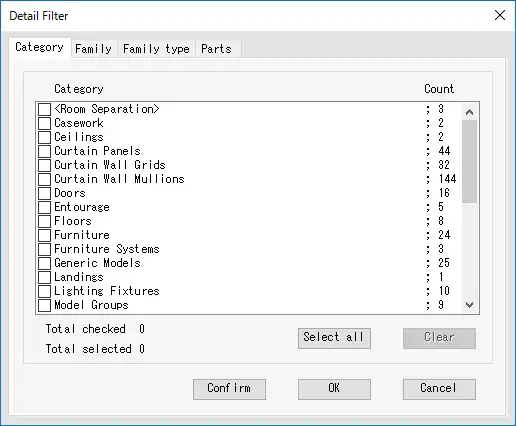
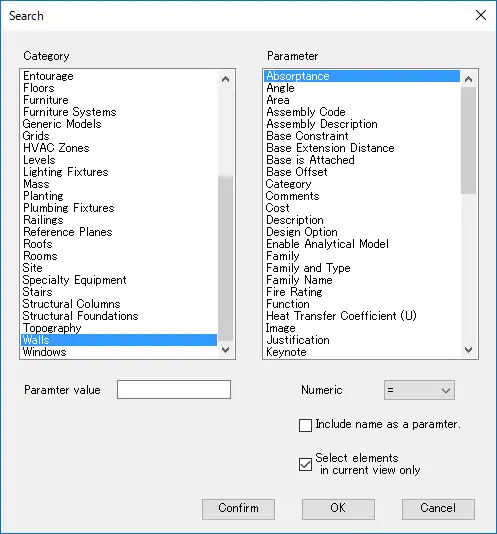
The standout feature of "Detail Filter Pro 2021" is the inclusion of "Search Filter" and "Common Search Filter", which provide users with more options for narrowing down their selections. With these tools, users can filter elements based on category and parameter values, similar to the "Quick select" feature in Autodesk AutoCAD. This makes it easier to identify and select the elements that matter most in a project.
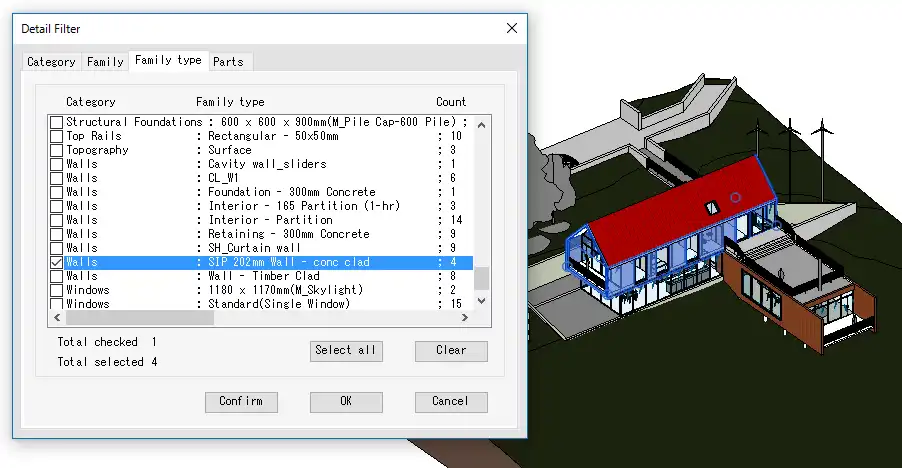
Additionally, "Detail Filter Pro" allows users to filter elements by category, family, family type, and parts materials. This level of specificity ensures that users can precisely target the elements they need, saving time and effort in the design process. The ability to filter elements out of selected elements or all elements in the current view adds flexibility to the plugin's functionality.

(Image by: 株式会社コンピュータシステム研究所)
Using the Filters
One of the key advantages of "Detail Filter Pro 2021" is the ease of use when applying filters. The plugin allows users to set operators as filtering conditions, making it simple to define the parameters for filtering elements. The highlighting function of each filter also helps users confirm the filtering effect, ensuring that the desired elements are correctly identified.
Moreover, "Detail Filter Pro" requires users to confirm their entitlement to use the app through purchaser information from the Autodesk App Store and sign-in information from Autodesk A360. This ensures that only authorized users can access the advanced capabilities of the plugin. In case of any delay in confirmation, the plugin provides clear instructions on how to troubleshoot the issue, ensuring a smooth user experience.
(Image by: 株式会社コンピュータシステム研究所)
Conclusion
Overall, "Detail Filter Pro 2021" is a powerful tool for Revit users looking to enhance their filtering capabilities within projects. The addition of "Search Filter" and "Common Search Filter" brings a new level of functionality to the plugin, allowing users to filter elements with precision and efficiency. The highlighting function and easy-to-use interface make it a valuable asset for architects and designers working with complex architectural designs. If you're looking to streamline your filtering process in Revit, "Detail Filter Pro 2021" is definitely worth a try.
(Image by: 株式会社コンピュータシステム研究所)
Similar apps:
- Free
- Free
- Free
- $5
- Free
- Free