 1 / 4
1 / 4About this app
Introduction
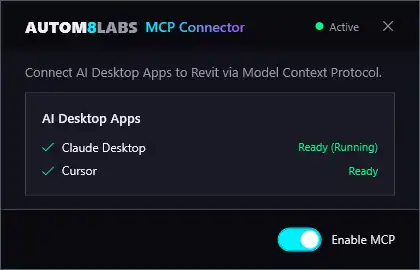
Revit is a powerful tool for architects and designers, but what if you could take it to the next level with artificial intelligence? AUTOM8LABS MCP Connector does just that, connecting AI assistants like Claude Desktop and Cursor directly to your Revit session using the Model Context Protocol (MCP). This innovative plugin allows you to ask questions about your model using natural language and get instant answers, making your workflow more efficient and intuitive.
Features and Functionality
The AUTOM8LABS MCP Connector comes with 36 free tools across 8 categories, providing a wide range of functionalities to enhance your Revit experience. From querying elements to selecting and navigating views, the plugin offers a comprehensive set of tools to streamline your workflow. Whether you need to check project information, search for specific elements, or extract schedule data, the MCP Connector has you covered.
One of the key features of the plugin is its one-click setup, which automatically configures Claude Desktop and Cursor for seamless integration with Revit. There is zero configuration required, no API keys or cloud accounts to worry about, making it easy to get started. The plugin also supports multi-instance connections, allowing you to connect to multiple Revit sessions simultaneously for increased productivity.
Named pipe communication with a binary protocol ensures fast and efficient data transfer, with no network overhead. All tools are read-only, ensuring that your model is never modified, providing a safe and secure environment for experimentation and exploration. Everything runs locally on your machine, ensuring that no data leaves your system, protecting your privacy and security.
User Experience and Benefits
The AUTOM8LABS MCP Connector revolutionizes the way you interact with Revit, providing a more intuitive and efficient workflow. The ability to ask questions about your model in natural language and get instant answers adds a new dimension to your design process, allowing you to focus on creativity rather than technicalities. With 36 free tools included, the plugin empowers you to explore your model in-depth, making it easier to find the information you need quickly and easily.
Whether you are a seasoned Revit user or just starting out, the AUTOM8LABS MCP Connector offers a user-friendly interface that simplifies complex tasks and enhances your overall experience. The seamless integration with AI assistants like Claude Desktop and Cursor opens up new possibilities for collaboration and creativity, bridging the gap between human intelligence and machine learning.
(Image by: AUTOM8LABS)
Conclusion
The AUTOM8LABS MCP Connector is a game-changer for Revit users looking to integrate artificial intelligence into their workflow. With its seamless integration, user-friendly interface, and wide range of functionalities, the plugin enhances your Revit experience and makes it easier than ever to interact with your model. Whether you are a designer, architect, or engineer, the AUTOM8LABS MCP Connector offers a powerful set of tools to streamline your workflow and unlock new possibilities in your design process. Try it out today and see the difference it can make in your projects!
Similar apps:
- Free
- Free
- $20
- Free
- $50
- $1.99