1 / 4
1 / 4About this app
Introduction
Revit users often find themselves in need of more advanced filtering options to efficiently select and manipulate elements within their projects. The "Detail Filter Pro 2020" plugin aims to address this need by providing additional capabilities for filtering and picking up desired elements beyond the standard Category filtering key. With features such as "Search Filter" and "Common Search Filter," this plugin offers a more robust and flexible filtering experience, akin to the popular "Quick select" tool in Autodesk AutoCAD.
(Image by: 株式会社コンピュータシステム研究所)
Exploring the Features
The "Detail Filter Pro" plugin builds upon the success of its predecessor, "Detail Filter," which has already garnered a favorable reputation on the Autodesk App Store. The new features introduced in this version aim to enhance the filtering process by allowing users to filter elements based on various criteria, including Category, Family, Family Type, Parts Materials, and parameter values.
The "Search Filter" functionality enables users to filter elements out of all elements or visible elements in the current view, based on Category and specific parameters. This feature provides a more granular level of control over element selection, making it easier to identify and manipulate specific components within a project.
Additionally, the "Common Search Filter" allows users to filter elements based on the value of a parameter within the same Category as the selected element. This feature streamlines the filtering process by automatically applying the desired filtering condition, saving time and effort for users.
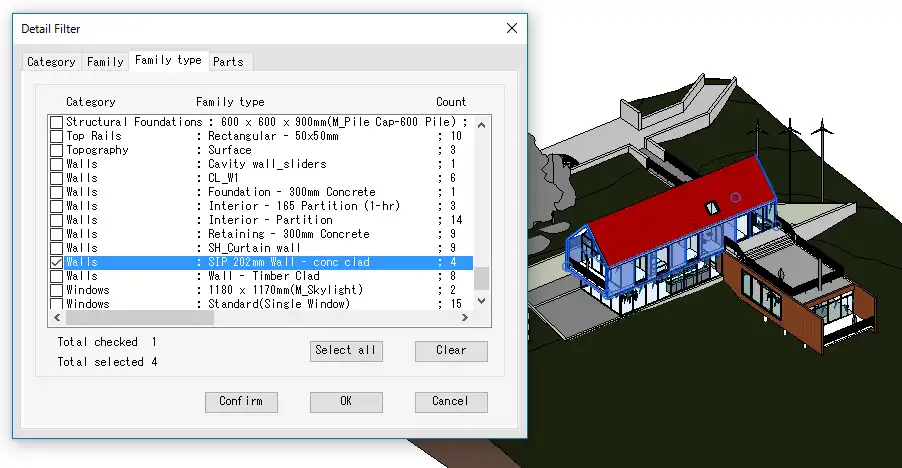
(Image by: 株式会社コンピュータシステム研究所)
Enhanced Filtering Capabilities
One of the key benefits of using "Detail Filter Pro" is the ability to filter elements by a range of parameters, beyond just Category. This level of customization allows users to tailor their filtering criteria to suit their specific project requirements, resulting in a more efficient and focused workflow.
Furthermore, the plugin offers a function to highlight filtered elements, making it easier for users to visualize the impact of their filtering choices. This visual feedback enhances the user experience, enabling users to quickly confirm the filtering effect and make any necessary adjustments.
It is worth noting that "Detail Filter Pro" is a non-free plugin, reflecting its advanced capabilities and enhanced filtering features. However, the investment in this plugin can pay off significantly in terms of improved productivity and streamlined workflow within Revit.
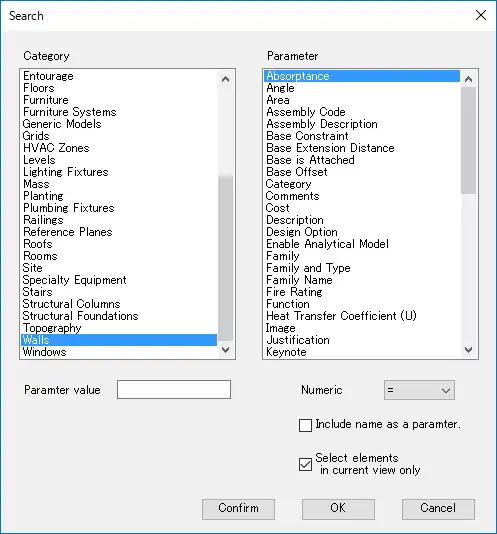
(Image by: 株式会社コンピュータシステム研究所)
Conclusion
The "Detail Filter Pro 2020" plugin is a valuable addition to any Revit user's toolkit, offering enhanced filtering capabilities that go beyond the standard Category filtering key. With features such as "Search Filter" and "Common Search Filter," users can easily pick up desired elements based on a range of criteria, similar to the functionality of Autodesk AutoCAD's "Quick select" tool.
By incorporating advanced filtering options and providing visual feedback on filtered elements, "Detail Filter Pro" streamlines the filtering process and enhances the overall user experience within Revit. While the plugin may require a purchase, the benefits it offers in terms of improved productivity and workflow efficiency make it a worthwhile investment for serious Revit users.
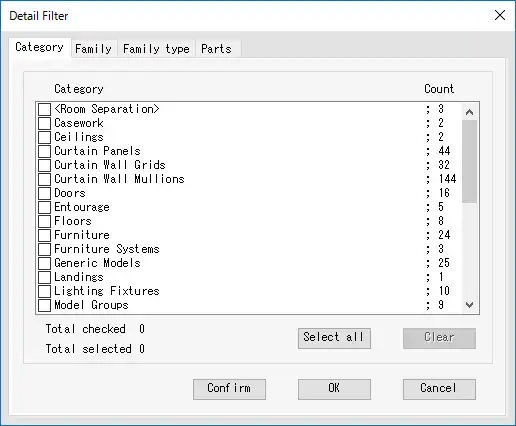
(Image by: 株式会社コンピュータシステム研究所)
Similar apps:
- Free
- Free
- $4.99/month
- Free
- $20
- $10/month