 1 / 4
1 / 4About this app
Introduction
Revit users are always on the lookout for tools and plugins that can streamline their workflow and improve efficiency. One such plugin that has been gaining attention is Detail Filter Pro 2022. With its enhanced capabilities for filtering and selecting elements based on various parameters, this plugin promises to be a valuable addition to your Revit toolkit.
(Image by: 株式会社コンピュータシステム研究所)
Features of Detail Filter Pro 2022
Detail Filter Pro 2022 builds upon the success of its predecessor, Detail Filter, by introducing two new features - Search Filter and Common Search Filter. These features allow users to pick up desired elements based on category and parameter values, similar to the "Quick Select" feature in AutoCAD.
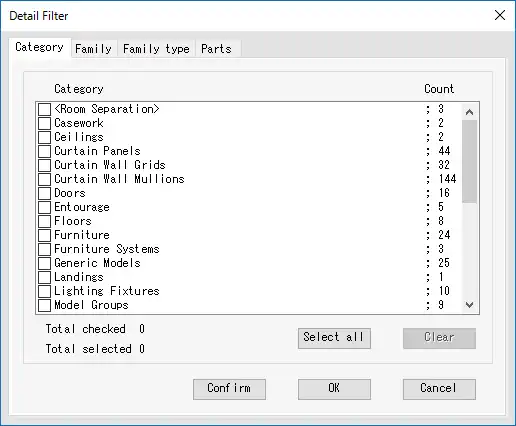
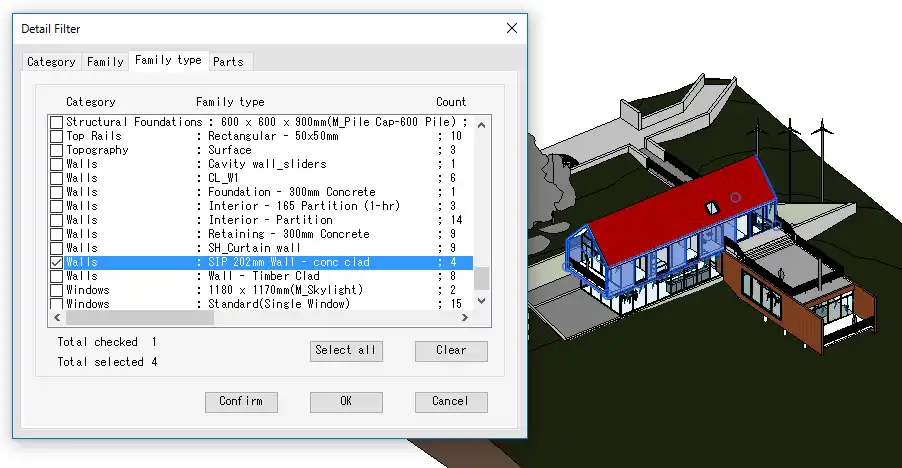
Detail Filter Pro allows for filtering elements based on parameters such as Category, Family, Family Type, and Parts Materials. This can be particularly useful when working with complex models that contain a large number of elements. The ability to filter out specific elements based on these parameters can save time and make navigation within the model more efficient.
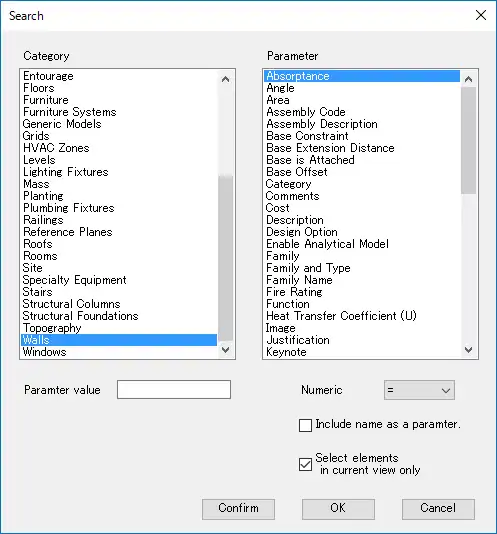
Search Filter enables users to filter elements from all elements or visible elements in the current view, based on category and parameters. Common Search Filter, on the other hand, allows for filtering elements based on the value of a parameter within the same category as the selected element. These filters can be combined with operators to create customized filtering conditions.
One of the standout features of Detail Filter Pro is its ability to highlight filtered elements, allowing users to easily visualize the effect of the filtering. This visual feedback can be invaluable when working with large models or when trying to identify specific elements within a complex structure.

(Image by: 株式会社コンピュータシステム研究所)
Using Detail Filter Pro 2022
Detail Filter Pro confirms user entitlement through purchaser information from the Autodesk App Store and sign-in information from Autodesk Account. In case of any time lag in confirmation, users can follow the steps provided by the plugin to activate the features.
To activate the plugin, users can simply place the cursor on one of the Detail Filter Pro commands and click on it when the command tooltip is displayed. This will activate the Detail Filter Pro panel, allowing users to start using the filtering and selection features.
(Image by: 株式会社コンピュータシステム研究所)
Conclusion
Detail Filter Pro 2022 is a powerful plugin that enhances the filtering and selection capabilities of Revit. With its intuitive interface and robust features, this plugin is a must-have for Revit users looking to streamline their workflow and improve efficiency. Whether you are working on a small project or a large-scale model, Detail Filter Pro can help you easily navigate and select elements with precision and ease. Give it a try and experience the difference it can make in your Revit workflow!
(Image by: 株式会社コンピュータシステム研究所)
Similar apps:
- Free
- Free
- Free
- $5
- $4.99/month
- Free