 1 / 4
1 / 4About this app
Introduction
When working on complex projects in Revit, the ability to filter and select elements efficiently is crucial for maintaining a streamlined workflow. The "Detail Filter Pro 2025" plugin offers advanced filtering capabilities that go beyond the basic Category filtering in Revit. With the addition of "Search Filter" and "Common Search Filter," this plugin provides users with more options to pick up desired elements based on specific criteria, similar to the "Quick select" feature in Autodesk AutoCAD.
(Image by: 株式会社コンピュータシステム研究所)
Enhanced Filtering Features
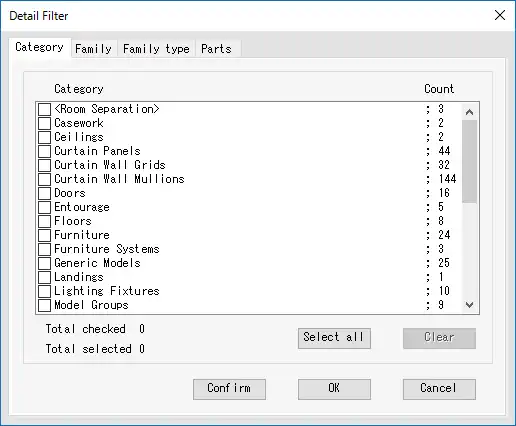
The standout feature of "Detail Filter Pro 2025" is its ability to filter elements based on a combination of Category, Family, Family Type, and Parts Materials. This level of detail allows users to pinpoint specific elements within their Revit projects with precision. The inclusion of "Search Filter" and "Common Search Filter" further expands the filtering capabilities by allowing users to filter elements by parameters beyond just Category.
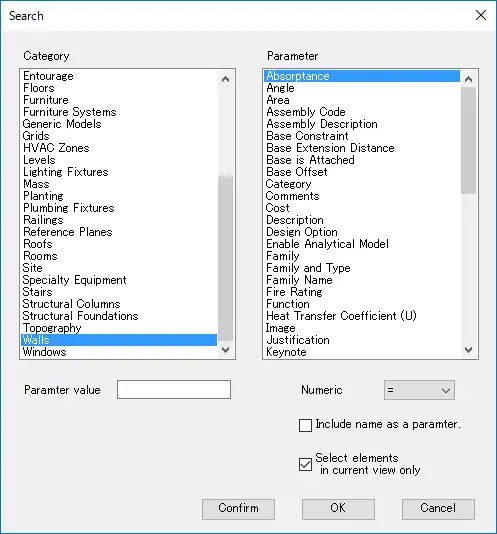
With "Search Filter," users can filter elements out of all elements or visible elements in the current view based on both Category and parameters. This functionality is particularly useful when working with large and complex models where it can be challenging to locate specific elements. Similarly, "Common Search Filter" enables users to filter elements by the value of a parameter within the same Category of the selected element, providing an additional layer of filtering criteria.

(Image by: 株式会社コンピュータシステム研究所)
Ease of Use and User Verification
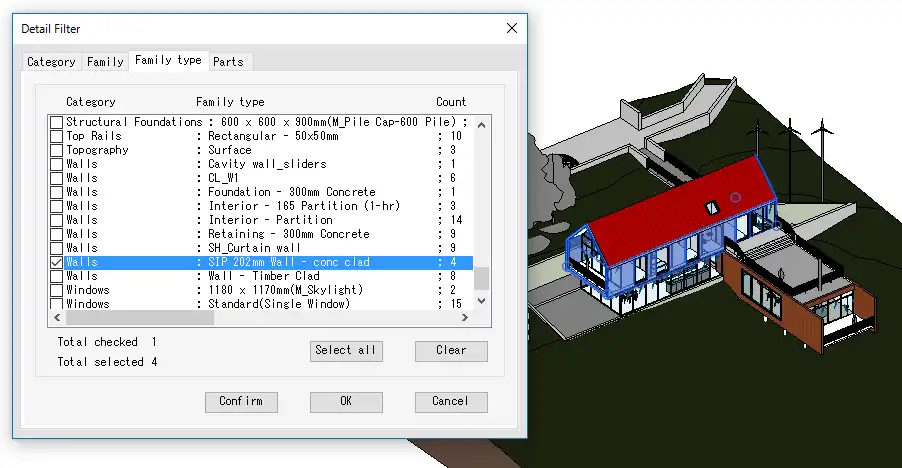
One of the strengths of "Detail Filter Pro 2025" is its user-friendly interface and intuitive workflow. The plugin's function of highlighting filtered elements makes it easy for users to visually confirm the filtering effect, ensuring that the desired elements have been accurately selected. This visual feedback enhances the overall user experience and helps to streamline the filtering process within Revit.
Additionally, "Detail Filter Pro" includes a verification system that confirms the user's entitlement to use the app. By cross-referencing purchaser information from the Autodesk App Store and sign-in information from Autodesk Account, the plugin ensures that only authorized users can access its features. In cases where there may be a time lag in confirmation, the plugin provides clear instructions for users to troubleshoot and activate the app effectively.
(Image by: 株式会社コンピュータシステム研究所)
Conclusion
Overall, "Detail Filter Pro 2025" is a valuable plugin for Revit users looking to enhance their filtering capabilities and streamline their workflow. With advanced filtering features such as "Search Filter" and "Common Search Filter," this plugin provides users with the tools they need to efficiently locate and select elements within their projects. The user-friendly interface, visual feedback, and user verification system further contribute to the plugin's appeal and usability.
If you are looking to improve your filtering workflow in Revit, "Detail Filter Pro 2025" is definitely worth considering. Give it a try and experience the enhanced filtering capabilities it has to offer!
(Image by: 株式会社コンピュータシステム研究所)
Similar apps:
- Free
- Free
- Free
- Free
- $1.99
- Free