 1 / 4
1 / 4About this app
Introduction
When working on complex projects in Revit, having the right tools to filter and select elements efficiently can save valuable time and improve productivity. This is where "Detail Filter Pro 2026" comes into play, offering advanced capabilities for filtering and picking up desired elements beyond just using Category as a filtering key. With the addition of "Search Filter" and "Common Search Filter", this plugin takes filtering in Revit to the next level.
(Image by: 株式会社コンピュータシステム研究所)
Features and Functionality
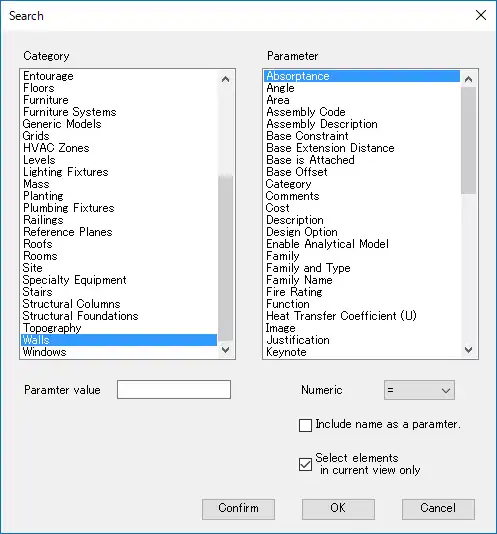
The key highlight of "Detail Filter Pro 2026" is the inclusion of "Search Filter" and "Common Search Filter", which allow users to pick up desired elements based on additional filtering keys such as category and parameter value. This functionality is reminiscent of the "Quick select" feature in Autodesk AutoCAD, making it easier to pinpoint and manipulate elements within a Revit project.
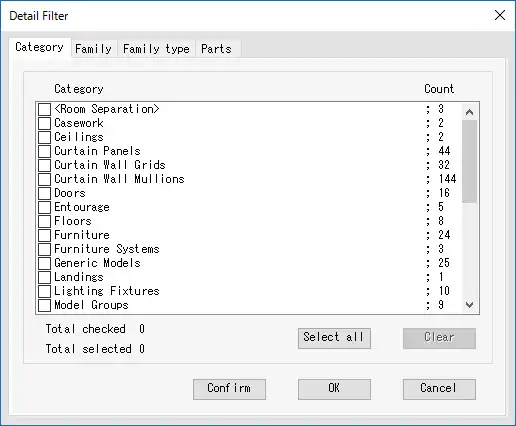
Additionally, "Detail Filter Pro" extends the capabilities of the previous version by enabling users to filter elements based on parameters such as Category, Family, Family Type, and Parts Materials. This level of specificity ensures that users can tailor their filtering criteria to suit their unique project requirements.
Another notable feature of "Detail Filter Pro" is the ability to filter elements out of all elements or visible elements in the current view, using the "Search Filter" functionality. This makes it easier to isolate and work with specific elements within a complex project, improving overall efficiency and accuracy.
Furthermore, the "Common Search Filter" allows users to filter elements by the value of a parameter within the same category as the selected element. This feature streamlines the filtering process, making it more intuitive and user-friendly.
One of the standout aspects of "Detail Filter Pro" is its function of highlighting filtered elements, which enables users to visually confirm the filtering effect. This visual feedback is invaluable in ensuring that the desired elements have been accurately selected, reducing errors and enhancing workflow efficiency.

(Image by: 株式会社コンピュータシステム研究所)
Ease of Use and Accessibility
Despite its advanced capabilities, "Detail Filter Pro 2026" is designed with user-friendliness in mind. The plugin seamlessly integrates into the Revit interface, making it easy to access and utilize its features. The intuitive design of the tool ensures that users can quickly navigate and apply filters without any steep learning curve.
Furthermore, "Detail Filter Pro" confirms users' entitlement to use the app by verifying purchaser information from the Autodesk App Store and sign-in information from Autodesk Account. In the event of any time lag in confirmation, the plugin provides clear instructions on how to resolve the issue, ensuring a seamless user experience.
(Image by: 株式会社コンピュータシステム研究所)
Conclusion
In conclusion, "Detail Filter Pro 2026" is a powerful and versatile plugin that enhances filtering capabilities in Revit. With its advanced features such as "Search Filter" and "Common Search Filter", users can easily select and manipulate elements within their projects with precision and efficiency. The plugin's user-friendly design and visual feedback mechanisms make it a valuable addition to any Revit user's toolkit. If you're looking to streamline your filtering workflow and improve productivity in Revit, "Detail Filter Pro 2026" is definitely worth a try.
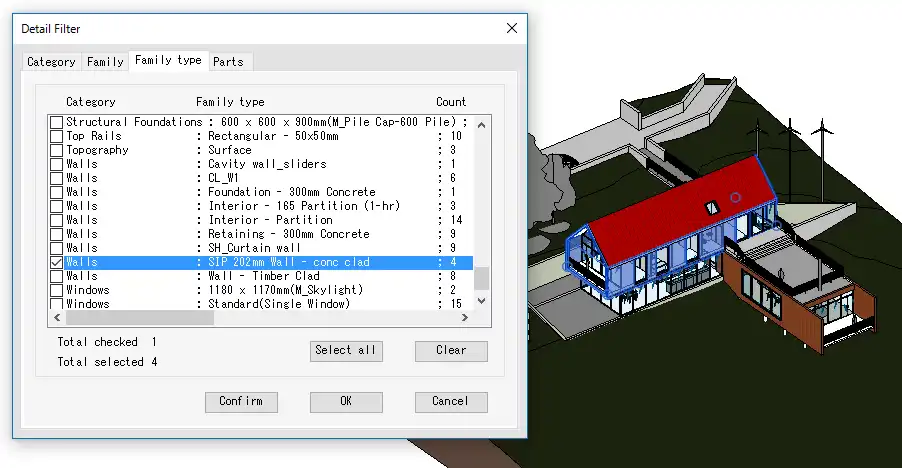
(Image by: 株式会社コンピュータシステム研究所)
Similar apps:
- Free
- $5
- $1.99
- Free
- $5
- $1.99/month