

About this app
SVS Exporter: A Game-Changing Revit Plugin for Conflict Detection
Introduction
SVS Exporter is a powerful Revit plugin designed to streamline the process of conflict detection between architectural and structural elements in building models. With its innovative features and user-friendly interface, this plugin revolutionizes the way architects and engineers collaborate on projects, saving time and improving efficiency. In this review, we will explore the key functionalities of SVS Exporter and discuss how it can benefit your workflow.
Features
One of the standout features of SVS Exporter is its Conflict Detection tool. By simply hitting the Calculate button, the plugin spatially tests every element pair between architectural and structural links, scoring the real overlap from 0 to 100. Unlike traditional bounding-box guesswork, SVS Exporter uses mesh-based calculations for precise results. This tool compares Walls, Floors, Structural Framing (beams), and Structural Columns, providing comprehensive clash detection for your models.
What sets SVS Exporter apart is its per-conflict chat and comments feature. When a clash is detected, architects and engineers can communicate in real time, discussing the issue right where it occurs. Users can assign each conflict to either the Architect or Structural team, or choose to ignore it. These assignments persist for both sides, ensuring coordinated resolution of conflicts. With the ability to jump to any clash using Zoom (3D), Plan, Isolate, and a Diff view, visualizing and addressing clashes has never been easier.
Additionally, SVS Exporter offers a one-click Excel export function for conflict reports. The exported file includes color-coded rows, auto-filters, and a metadata sheet, as well as a Coordination % badge for quick reference. This streamlined export process simplifies communication and collaboration among team members.
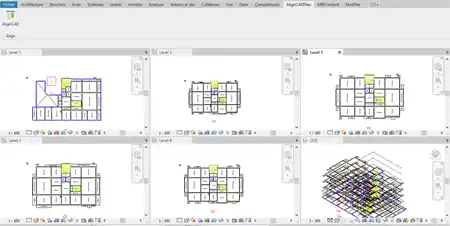
Another notable feature of SVS Exporter is its Color Mode tool. Users can tag their model by discipline, such as Architectural or Structural, and toggle the colors on to see exactly who owns each element. With Architect elements displayed in blue, Structural elements in yellow, and over 40 other categories available, users can focus on what matters most. Tagging elements also enables Conflict Detection, enhancing the plugin's functionality and efficiency.
SVS Exporter makes tagging elements a breeze, with one-click tagging across Walls, Floors, Structural Framing, and Structural Columns. The plugin ensures that old tags are cleared before running a new analysis, preventing duplicates and maintaining data integrity. With the ability to easily turn Color Mode on and off, users can switch between views seamlessly, enhancing their modeling experience.
Benefits
SVS Exporter offers a range of benefits for architects and engineers working on collaborative projects. By streamlining conflict detection and resolution, the plugin saves time and reduces errors, improving overall project efficiency. The real-time communication feature allows team members to address clashes quickly and effectively, fostering collaboration and coordination.
The ability to export conflict reports to Excel with just one click simplifies documentation and communication among project stakeholders. The color-coding and tagging features of SVS Exporter enhance model visualization, making it easy to identify ownership of elements and focus on critical areas of the design. With its user-friendly interface and intuitive tools, SVS Exporter empowers users to work more efficiently and effectively.
Summary
In conclusion, SVS Exporter is a game-changing Revit plugin that revolutionizes conflict detection in building models. With its innovative features, such as Conflict Detection, Color Mode, and one-click Excel export, this plugin enhances collaboration, saves time, and improves project efficiency. Whether you are an architect or an engineer, SVS Exporter is a valuable tool that can streamline your workflow and elevate your project outcomes. Try SVS Exporter today and experience the difference it can make in your Revit projects.