 1 / 6
1 / 6About this app
Are you tired of wasting time searching for families in Autodesk Revit? Do you find your libraries chaotic and disorganized? Look no further than the Family Browser Premium plugin, a powerful tool designed to streamline your family management process and boost your productivity. With a range of exclusive features, this plugin takes your Revit experience to a whole new level.
Exclusive Features of Family Browser Premium
Let’s take a closer look at some of the key features that make the Family Browser Premium stand out from other family management tools:
(Image by: Kleen Software GmbH)
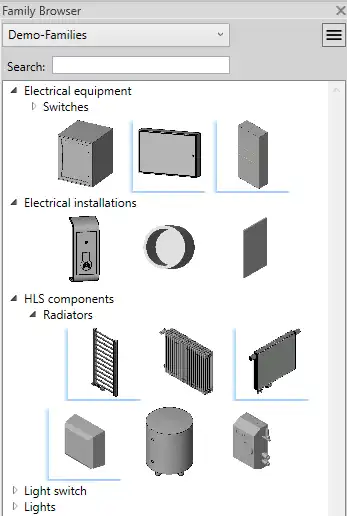
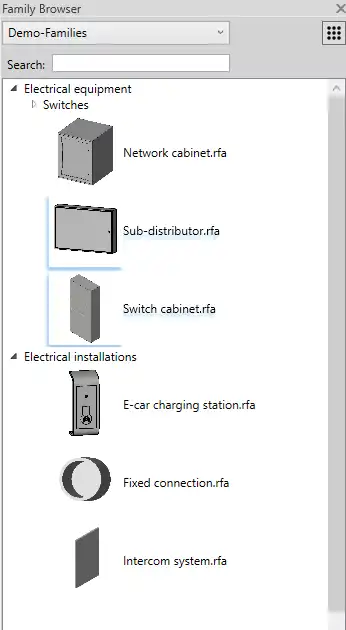
List and Row View
Switch between the classic row view and a new list view that displays the names of the families, providing you with a better overview of your library. This feature allows you to navigate through your families more efficiently and find what you need quickly.
(Image by: Kleen Software GmbH)
Search Function
With the new search function, you can easily find specific families and folders in your library. This quick and intuitive feature saves you time and eliminates the frustration of manual searching, allowing you to focus on your design work.
(Image by: Kleen Software GmbH)
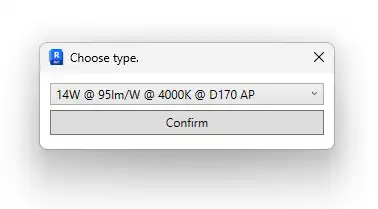
Marking of Families with Multiple Types
Families with multiple types are automatically marked in the Family Browser Premium. This makes it easy for you to select the desired type before placement, ensuring that you are using the correct family for your project.
These are just a few of the many features that make the Family Browser Premium a must-have tool for architects, engineers, and planners working with Revit. Whether you are working on small projects or large construction projects, this plugin can help you manage your families effectively and increase your productivity.
(Image by: Kleen Software GmbH)
Why Choose Family Browser Premium?
The Family Browser Premium has been specially developed for BIM experts, architects, and engineers who are looking to enhance their workflow in Revit. Here are some reasons why you should consider using this plugin:
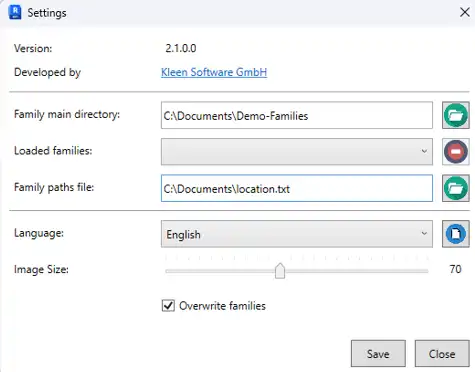
Organized Library: With the folder hierarchy feature, you can organize your families with recursive folder recognition. This allows you to create hierarchical structures for maximum clarity, making it easier to find and manage your families.
Customizable Image Size: Customize the icon size using a slider, so you can adjust the display to suit your preferences and working style.
Storage of Family Paths: Manage different libraries via TXT files, giving you the flexibility to work with multiple libraries and easily switch between them.
Multilingualism: Expand the program with your language files and choose between different languages via a drop-down menu. This feature allows you to work in your preferred language, making the plugin more user-friendly.
Overwrite Families: Activate the function to automatically update existing families in the project when changes are made. This feature ensures that your project remains up-to-date with the latest family revisions, saving you time and effort in manual updates.
(Image by: Kleen Software GmbH)
Conclusion
The Family Browser Premium is a game-changer for anyone working with Revit families. Its intuitive interface, powerful features, and customizable options make it a valuable tool for enhancing your workflow and increasing your productivity. Whether you are a seasoned architect or a beginner in the world of BIM, this plugin can help you manage your families efficiently and streamline your design process. Give the Family Browser Premium a try and experience the difference it can make in your Revit projects.
Similar apps:
- Free
- Free
- $20
- $1.99
- $10/month
- $5