1 / 12
About this app
Introduction
The world of Building Information Modeling (BIM) is constantly evolving, and with it comes the need for powerful tools that can enhance productivity and streamline workflows. One such tool is the Kobi Toolkit for Autodesk® Revit®. Designed to address the challenges faced by architects, engineers, and project managers, this plugin offers a comprehensive set of features that not only improve the efficiency of BIM processes but also enhance the overall experience of working within Revit. With over 40 individual tools spread across nine sets of functionalities, the Kobi Toolkit is a game-changer for anyone involved in civil engineering projects.
(Image by: KobiLabs)
Key Features of Kobi Toolkit
The Kobi Toolkit is designed with a focus on enhancing Revit's capabilities, allowing users to automate workflows and improve the accuracy of their models. Below are some of the standout features that make the Kobi Toolkit a must-have for Revit users:
BIM Query
One of the most notable tools included in the Kobi Toolkit is BIM Query. This tool streamlines property management within your Revit model by providing a user-friendly spreadsheet editor reminiscent of Excel functionalities. Users can effortlessly edit Type and Instance properties for selected categories, making it simple to sort, filter, and copy parameters directly within their projects. This level of control significantly reduces the time spent on property management, allowing users to focus on more critical aspects of their design.
Filtering Tool
The Filtering Tool is another valuable addition that empowers users to select specific elements within their projects. By grouping elements according to user-defined criteria, such as category, level, or work set, this tool makes it easier to navigate complex models. The ability to filter elements efficiently is crucial in large projects, where the sheer volume of data can often become overwhelming. With the Kobi Toolkit, users gain the ability to manage their models with precision and ease.
Power BI Export
In today's data-driven world, being able to visualize and manipulate data quickly is essential. The Kobi Toolkit's Power BI Export feature allows users to leverage Revit data to create tables, graphs, and visual representations without needing to open the Revit file. This capability is particularly useful for meetings and report generation, where stakeholders require quick access to project data. By enabling efficient data manipulation and review, the Power BI Export tool enhances decision-making processes and fosters collaboration among project teams.
Project Cleanup
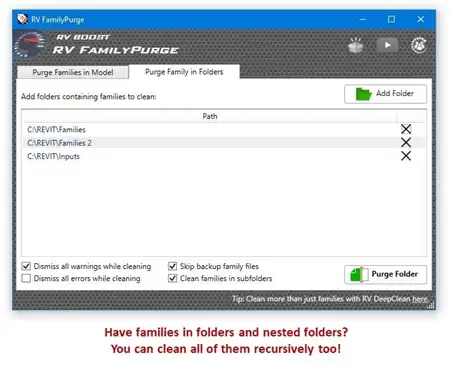
Project Cleanup is another standout feature that provides users with the ability to create lightweight Revit files. This tool helps in cleaning up a project by removing unplaced rooms, purging unnecessary line types or materials, and eliminating redundant object styles and views. By streamlining the project file, users can improve Revit's performance, making it easier to work on complex models without experiencing slowdowns. This cleanup process is not only beneficial for file management but also contributes to a more organized and efficient BIM environment.
Material Legend and Legend by Category
Creating legends in Revit can often be a time-consuming task, but with the Kobi Toolkit, this process is automated. The Material Legend and Legend by Category tools allow users to generate legends effortlessly with just a few clicks. By simplifying the workflow surrounding legend creation, users can save valuable time and direct their focus towards more critical design tasks. This feature exemplifies the Kobi Toolkit's commitment to enhancing productivity and efficiency in BIM workflows.

(Image by: KobiLabs)
Enhanced Productivity and Efficiency
What sets the Kobi Toolkit apart from other plugins is its holistic approach to improving BIM workflows. With tools designed for various aspects of Revit usage, from property management to data visualization, users can achieve a higher level of productivity and efficiency. The integration of these tools allows for a seamless transition between different tasks, reducing the need to switch between multiple plugins or manual processes. This all-in-one approach not only saves time but also minimizes the potential for errors, resulting in more accurate and reliable project outcomes.
Moreover, Kobi Toolkit's user-friendly interface ensures that users, regardless of their skill level, can take full advantage of its features. The learning curve is minimal, which means that teams can quickly adopt the toolkit and start reaping the benefits almost immediately. This is particularly important in fast-paced environments where deadlines are tight, and efficiency is paramount.

(Image by: KobiLabs)
Community Support and Continuous Development
Another significant advantage of the Kobi Toolkit for Autodesk® Revit® is the strong community and support that surrounds it. Users can access a wealth of resources, including tutorials, forums, and customer support, making it easier to troubleshoot issues and learn how to maximize the toolkit's capabilities. The developers behind Kobi Toolkit are also committed to continuous improvement, regularly updating the software based on user feedback and industry trends. This commitment to quality ensures that the toolkit remains relevant and effective in addressing the evolving needs of its users.
Furthermore, the community-driven approach fosters a collaborative environment where users can share tips, tricks, and best practices. This sharing of knowledge not only enhances individual user experiences but also contributes to the overall growth of the BIM community. As more users adopt the Kobi Toolkit, the collective expertise and shared insights lead to improved workflows across projects and disciplines.

(Image by: KobiLabs)
Summary
In conclusion, the Kobi Toolkit for Autodesk® Revit® is an essential plugin for professionals involved in BIM processes. With its extensive range of tools designed to enhance workflow and boost productivity, the Kobi Toolkit stands out as a valuable asset in the civil engineering landscape. From property management with BIM Query to efficient data visualization with Power BI Export, each tool is crafted to simplify complex processes and improve overall project efficiency.
The user-friendly interface and strong community support further enhance the toolkit's appeal, allowing users to adopt it seamlessly and benefit from ongoing improvements. Whether you're an architect, engineer, or project manager, the Kobi Toolkit can transform the way you work with Revit, making your BIM projects more efficient and effective. If you're looking to elevate your BIM workflow and maximize productivity, the Kobi Toolkit for Autodesk® Revit® is undoubtedly worth exploring.

(Image by: KobiLabs)
Similar apps:
- Free
- Free
- Free
- Free
- Free
- $4.99/month