 1 / 4
1 / 4About this app
Introduction
Revit has become an essential tool for architects and designers, offering powerful features to create detailed and accurate models. However, when it comes to filtering and selecting specific elements, the built-in capabilities may sometimes fall short. That's where "Detail Filter Pro 2024" comes into play. This Revit plugin expands the filtering options and provides additional tools to effortlessly pick up desired elements, making your workflow more efficient and precise.
(Image by: 株式会社コンピュータシステム研究所)
Enhanced Filtering Capabilities
Unlike the previous version of "Detail Filter", which already had a favorable reputation in the Autodesk App Store, "Detail Filter Pro" brings new functionalities to the table. It introduces two new features: "Search Filter" and "Common Search Filter" that work alongside the existing filtering options.
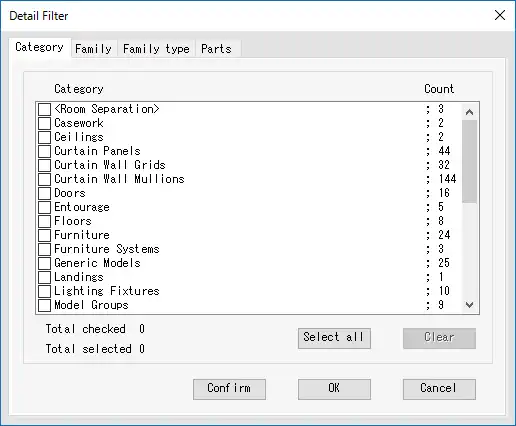
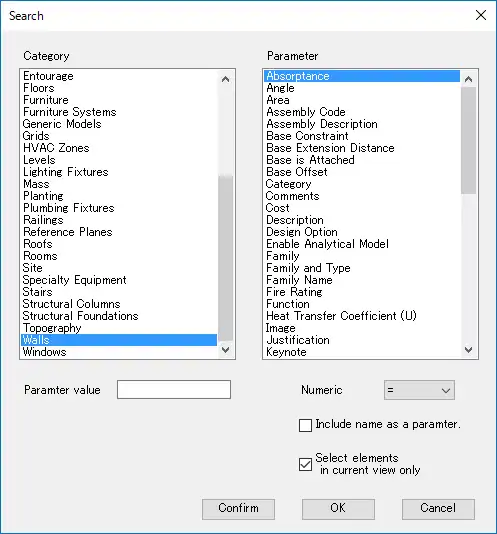
The "Search Filter" allows users to filter elements based on category and parameter values. This is similar to the "Quick select" feature in Autodesk's AutoCAD, enabling easy selection of desired elements from a vast pool of options. Whether you need to filter elements out of all the elements or just the ones visible in the current view, the "Search Filter" has got you covered.
The "Common Search Filter" takes filtering a step further by allowing you to filter elements based on parameter values within the same category as the selected element. This offers a convenient way to refine your selection based on specific criteria, ensuring you have complete control over the filtering process.
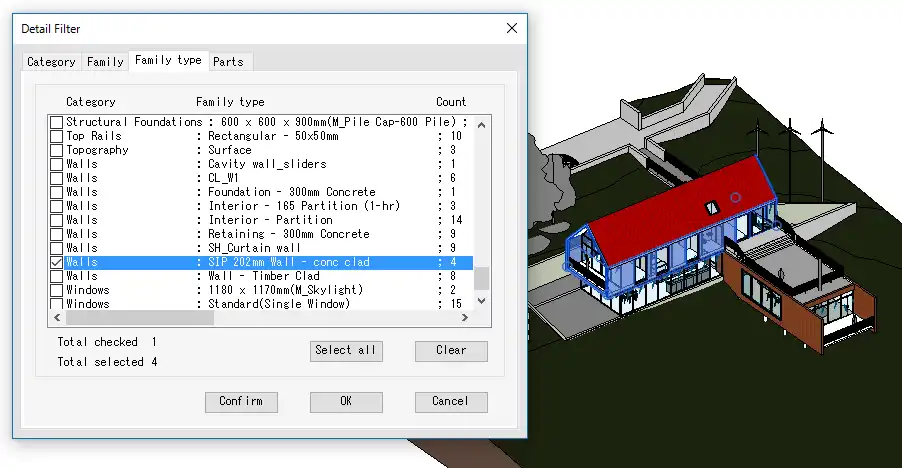
Both the "Search Filter" and the "Common Search Filter" come with a setting operator, allowing you to define the filtering conditions precisely. By setting up these filters, you can quickly identify and highlight the elements that meet your desired criteria, providing a visual confirmation of the filtering effect.

(Image by: 株式会社コンピュータシステム研究所)
Streamlined User Experience
One of the standout features of "Detail Filter Pro" is its seamless integration with the Autodesk ecosystem. The plugin confirms your entitlement to use the app by retrieving information from the purchaser's details in the Autodesk App Store and your sign-in information from Autodesk Account. This level of integration ensures a hassle-free experience, validating your access to the plugin without any unnecessary delays.
In case there is a time lag in the confirmation process, the plugin provides simple steps to rectify the issue. By signing in to your Autodesk Account using the same username as the purchaser of "Detail Filter Pro" and interacting with any of the plugin's commands, you can activate the "Detail Filter Pro" panel.
(Image by: 株式会社コンピュータシステム研究所)
Conclusion
Detail Filter Pro 2024 is a must-have plugin for Revit users who require advanced filtering capabilities. With its new "Search Filter" and "Common Search Filter" features, selecting and filtering elements has never been easier. The ability to highlight filtered elements and the seamless integration with the Autodesk ecosystem further enhance the user experience.
Don't let the limitations of the default filtering options slow down your workflow. Give Detail Filter Pro 2024 a try and discover a whole new level of control and efficiency in your Revit projects.
(Image by: 株式会社コンピュータシステム研究所)
Similar apps:
- Free
- Free
- $15/month
- Free
- Free
- Free